Webhook - On-Ramp
This section explains the steps to configure callback URLs for receiving events about completed on-ramp transactions.
Configuring Webhook
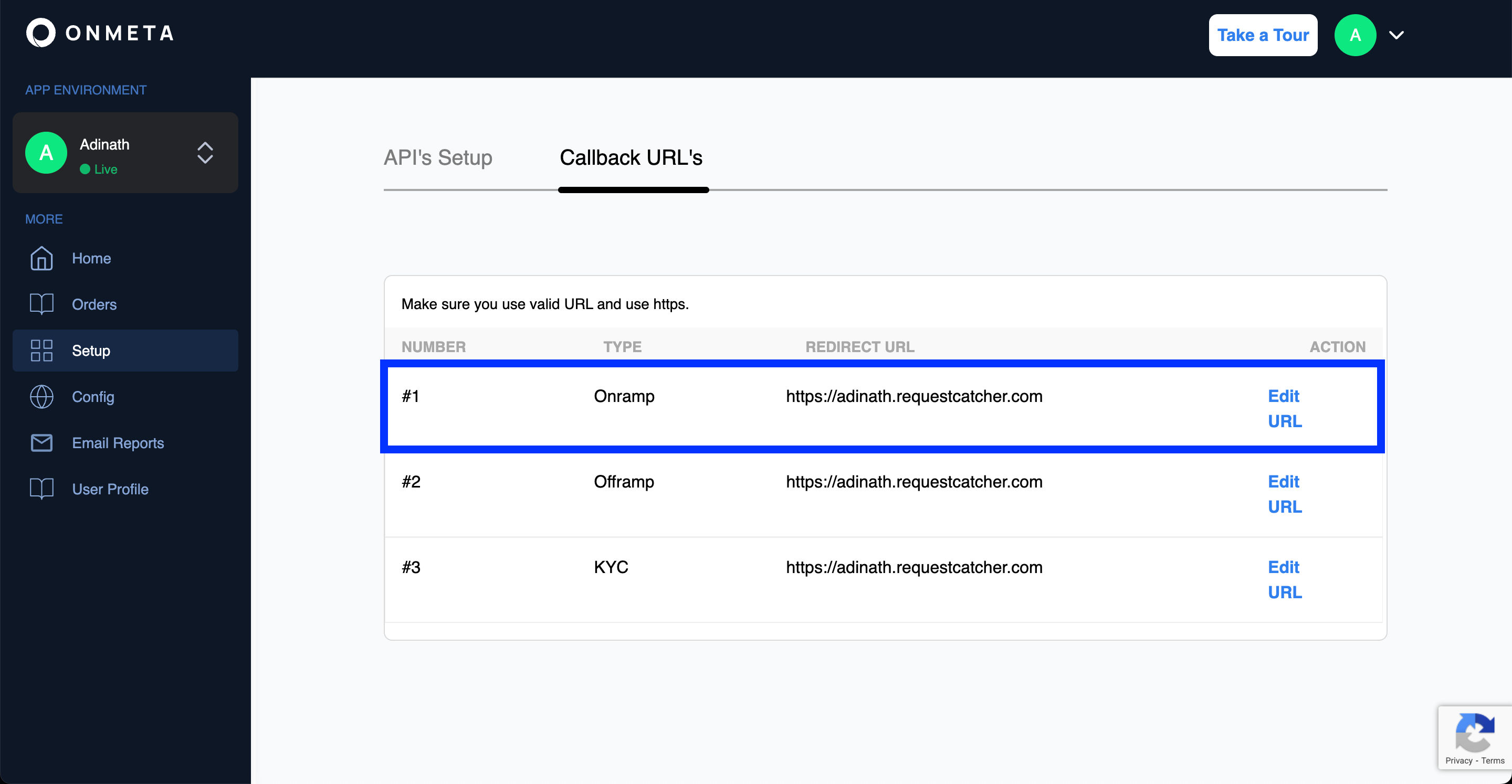
Webhooks are configured in the merchant dashboard.
Inside the Setup section, webhooks can be added and modified under the Callback URL's section.
Webhook Security & HMAC Verification
Your webhook endpoint is a public URL — anyone on the internet can send a POST request to it. Without verification, a malicious actor could forge fake order events and trick your system into releasing goods, updating balances, or triggering downstream actions based on fraudulent data.
Why HMAC?
Every time Onmeta sends a webhook to your server, it attaches a signature in the X-Onmeta-Signature request header. This signature is a fingerprint of the exact payload that was sent, generated using a secret key only you and Onmeta share — your API Secret from the merchant dashboard.
Here's why this matters:
- Authenticity — If the signature matches, the request genuinely came from Onmeta. Nobody else knows your API Secret, so nobody else can produce the same signature.
- Integrity — The signature is computed over the full request body. Even a single character change in the payload would produce a completely different hash, making tampering immediately detectable.
- Replay protection — You can extend this by rejecting events with timestamps too far in the past.
How it works
Onmeta uses HMAC-SHA256 — a standard cryptographic algorithm that combines your payload with your secret key and produces a fixed-length hex string. On your end, you run the same computation on the incoming body. If your result matches the header value, the event is genuine.
HMAC-SHA256(apiSecret, JSON.stringify(requestBody)) === X-Onmeta-Signature
Verification Example
- Node.js
- Python
- PHP
const crypto = require('crypto');

function verifyWebhook(req) {
  const receivedSignature = req.headers['x-onmeta-signature'];
  const apiSecret = process.env.ONMETA_API_SECRET; // from merchant dashboard

  // Recompute the HMAC using the raw request body
  const hmac = crypto.createHmac('sha256', apiSecret);
  hmac.update(JSON.stringify(req.body));
  const expectedSignature = hmac.digest('hex');

  if (expectedSignature !== receivedSignature) {
    throw new Error('Invalid webhook signature — request may be forged');
  }

  // Safe to process
  return true;
}
import hmac
import hashlib
import json
import os

def verify_webhook(body: dict, received_signature: str) -> bool:
    api_secret = os.environ['ONMETA_API_SECRET']  # from merchant dashboard

    expected = hmac.new(
        api_secret.encode('utf-8'),
        json.dumps(body, separators=(',', ':')).encode('utf-8'),
        hashlib.sha256
    ).hexdigest()

    if not hmac.compare_digest(expected, received_signature):
        raise ValueError('Invalid webhook signature — request may be forged')

    return True
function verifyWebhook(array $body, string $receivedSignature): bool {
    $apiSecret = getenv('ONMETA_API_SECRET'); // from merchant dashboard

    $expected = hash_hmac('sha256', json_encode($body), $apiSecret);

    if (!hash_equals($expected, $receivedSignature)) {
        throw new Exception('Invalid webhook signature — request may be forged');
    }

    return true;
}
Log in to your Merchant Dashboard → Setup → API's Setup. Use the Client Secret (not the Client ID) as the HMAC secret. Keep this value private and never expose it in client-side code or public repositories.
Completed Order
{{configured_webhook_url}}This callback will be triggered when the crypto coins are deposited to the given receiver address. It will use the configured webhook URL to send order completed details in the POST body.
Event Type: onramp
Make sure you have firewall rules configured to allow receiving the webhook body, otherwise your firewall might block our webhook requests.
Headers
| Header | Type | Required | Description |
|---|---|---|---|
Accept | string | Yes | application/json |
Content-Type | string | Yes | application/json |
X-Onmeta-Signature | string | Yes | HMAC signature for webhook verification |
Request Body Parameters
| Parameter | Type | Required | Description |
|---|---|---|---|
fiat | number | Yes | Fiat amount |
receiverWalletAddress | string | Yes | Wallet address receiving the crypto |
buyTokenSymbol | string | Yes | Symbol of the purchased token |
buyTokenAddress | string | Yes | Contract address of the purchased token |
orderId | string | Yes | Unique order identifier |
status | string | Yes | Order status |
currency | string | Yes | Fiat currency code |
chainId | number | Yes | Blockchain network chain ID |
customer | object | Yes | Customer information object |
txnHash | string | Yes | Blockchain transaction hash |
transferredAmount | string | Yes | Amount transferred in human-readable format |
transferredAmountWei | string | Yes | Amount transferred in wei |
createdAt | string | Yes | Order creation timestamp |
eventType | string | Yes | Event type identifier (value: "onramp") |
metaData | object | No | Onmeta's internal metadata (e.g. conversionRate, commission) merged with any custom key-value pairs you passed in the metaData field at order creation — your custom values are echoed back here |
Code Examples
- cURL
- Node.js
- Python
curl --location -g --request POST '{{configured_webhook_url}}' \
--header 'Accept: application/json' \
--header 'Content-Type: application/json' \
--header 'X-Onmeta-Signature: string' \
--data-raw '{
  "fiat": 100,
  "receiverWalletAddress": "0x14o2422324232323232323232232",
  "buyTokenSymbol": "MATIC",
  "buyTokenAddress": "0xeeeeeeeeeeeeeeeeeeeeeeeeeeeeeeeeeeeeeeee",
  "orderId": "63c93f0ffa666e128b7ab131",
  "status": "completed",
  "currency": "INR",
  "chainId": 80001,
  "customer": {
    "id": "63aaedf35b07a87b1f912023",
    "email": "test@test.com",
    "phone": {},
    "created_at": "2022-12-27T13:06:59.068Z"
  },
  "createdAt": "2023-01-19T13:01:03.289Z",
  "txnHash": "0xae21ff484bd2d05d22f6....7d1f795e9e09cda97b4d522",
  "transferredAmount": "0.01",
  "transferredAmountWei": "10000000000000000",
  "eventType": "onramp",
  "metaData": {
    "conversionRate": "90.2",
    "commission": "0"
  }
}'
const crypto = require('crypto');

// Verify webhook signature
function verifyWebhookSignature(postBody, signature, apiSecret) {
  let hmac = crypto.createHmac('sha256', apiSecret);
  hmac.update(JSON.stringify(postBody));
  let hash = hmac.digest('hex');
  return hash === signature;
}

// Example webhook handler
app.post('/webhook', (req, res) => {
  const signature = req.headers['x-onmeta-signature'];
  const isValid = verifyWebhookSignature(req.body, signature, apiSecret);

  if (!isValid) {
    return res.status(401).json({ error: 'Invalid signature' });
  }

  // Process webhook
  console.log('Webhook received:', req.body);
  res.status(200).json({ success: true });
});
import hmac
import hashlib
import json

def verify_webhook_signature(post_body, signature, api_secret):
    message = json.dumps(post_body, separators=(',', ':'))
    hash_object = hmac.new(
        api_secret.encode('utf-8'),
        message.encode('utf-8'),
        hashlib.sha256
    )
    computed_hash = hash_object.hexdigest()
    return computed_hash == signature

# Example webhook handler
@app.route('/webhook', methods=['POST'])
def webhook():
    signature = request.headers.get('X-Onmeta-Signature')
    is_valid = verify_webhook_signature(request.json, signature, api_secret)

    if not is_valid:
        return {'error': 'Invalid signature'}, 401

    # Process webhook
    print('Webhook received:', request.json)
    return {'success': True}, 200
Response Sample
{
  "fiat": 100,
  "receiverWalletAddress": "0x14o2422324232323232323232232",
  "buyTokenSymbol": "MATIC",
  "buyTokenAddress": "0xeeeeeeeeeeeeeeeeeeeeeeeeeeeeeeeeeeeeeeee",
  "orderId": "63c93f0ffa666e128b7ab131",
  "status": "completed",
  "currency": "INR",
  "chainId": 80001,
  "customer": {
    "id": "63aaedf35b07a87b1f912023",
    "email": "test@test.com",
    "phone": {},
    "created_at": "2022-12-27T13:06:59.068Z"
  },
  "createdAt": "2023-01-19T13:01:03.289Z",
  "txnHash": "0xae21ff484bd2d05d22f6....7d1f795e9e09cda97b4d522",
  "transferredAmount": "0.01",
  "transferredAmountWei": "10000000000000000",
  "eventType": "onramp",
  "metaData": {
    "conversionRate": "90.2",
    "commission": "0"
  }
}
Webhook Events
Onmeta provides the following webhook events for real-time notifications during the on-ramp flow.
| # | Event Name | Description |
|---|---|---|
| 1 | fiatPending | This event is triggered when a user has initialised an order but fiat deposit from user is pending. |
| 2 | orderReceived | This event is triggered when a user completes payment and Onmeta has initiated the crypto transfer. |
| 3 | InProgress(optional) | This event is triggered when the order is in-progress on the blockchain. |
| 4 | fiatReceived | This event is received on confirming that Onmeta has received payment for the on-ramp order. |
| 5 | transferred | This event is triggered when a user's token transfer is confirmed on the blockchain. |
| 6 | completed | This event is triggered when a user's order is completed and the user has received the tokens. |
| 7 | expired | When an order remains pending for more than three hours, the order is expired and this webhook event is triggered. |
| 8 | refunding | Triggered when a fiat refund is actively being processed back to the user's bank account. |
| 9 | refunded | Triggered when the fiat refund has been successfully returned to the user's bank account. This is the terminal refund event — use it to mark the order as resolved rather than polling. |
Example Webhook Request
{
  "fiat": 100,
  "receiverWalletAddress": "0xF12dc1E2EEb4d0475DE270447A92a481635caF4a",
  "buyTokenSymbol": "MATIC",
  "buyTokenAddress": "0xeeeeeeeeeeeeeeeeeeeeeeeeeeeeeeeeeeeeeeee",
  "orderId": "641c30286ad7d01834a02e2c",
  "status": "fiatPending",
  "currency": "INR",
  "chainId": 137,
  "customer": {
    "id": "web52390easf35fas2a25d3fffwsdae",
    "email": "documentation@onmeta.in",
    "phone": {},
    "created_at": "2023-01-04T06:58:24.968Z"
  },
  "createdAt": "2023-03-23T10:55:36.584Z",
  "txnHash": "",
  "transferredAmount": "0.990628",
  "transferredAmountWei": "990628498656169300",
  "eventType": "onramp",
  "metaData": {
    "submeta1": "metadata"
  }
}